
A grocery list on a sticky note, an invoice in a spreadsheet, a quote in an email thread: the lists we share are scattered, and none of them say whether anything has been paid. Settleo Slips bring them into one place, with checkboxes, prices, the people involved and a payment record.
Pick the right slip for the job
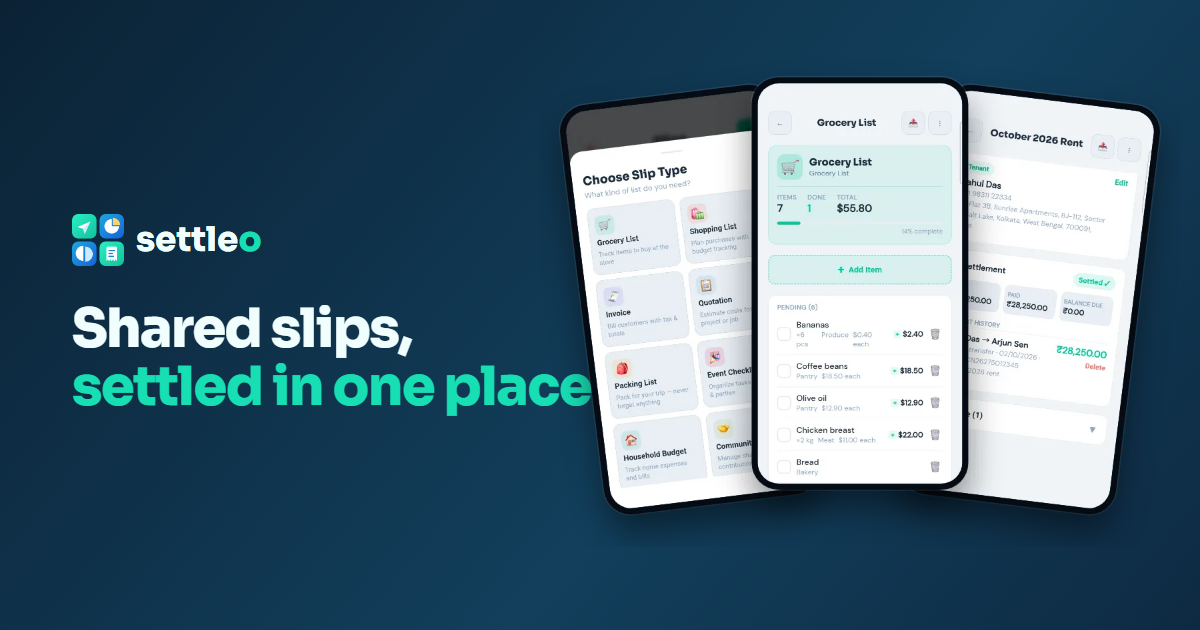
When you create a slip, choose a type and Settleo starts you off with sensible items and roles:
- Grocery List and Shopping List: items, quantities and prices, ticked off as you shop.
- Invoice and Quotation: line items with unit prices and totals for a client.
- Packing List and Event Checklist: tasks and things to bring, shared with the group.
- Household Budget, Community Fund, House Rent, School Supplies, Tickets, or a Custom List.
Shop together: a shared grocery list
Create a Grocery List and add items with quantity, unit and price, such as 6 bananas, a kilo of coffee beans or two kilos of chicken. Invite family members or friends to the slip and everyone sees the same list. Tick items off as they go in the trolley; the slip shows how many are done and the running total, so you know the bill before the checkout.
Parties: who the slip is between
Every slip now comes with two parties whose roles match the slip type:
- Invoice: Seller and Buyer
- Quotation: Vendor and Client
- House rent: Landlord and Tenant
- Community fund: Collector and Contributor
- Event: Organiser and Vendor
Your own name and phone are filled in for the first party. For each party you can add an address, a tax ID (GSTIN, PAN or VAT) and payment details: bank, account number, IFSC or routing code, and UPI ID. Need a third party, like a guarantor or witness? Add as many as you need.
An address for what the slip is about
Slips also have a subject address, labelled for the type: Property address for rent, Venue address for events, Delivery / site address for invoices. It is printed on the PDF so the document stands on its own.
Settle with payment details
When money changes hands, tap Settle / record payment. Settleo suggests who usually pays for that slip type and the balance still due, and shows the payee's bank or UPI details to the payer. Record the method (bank transfer, UPI, cash, card, cheque or wallet), the reference number and the date. The slip shows Unpaid, Partially paid or Settled ✓, with the full payment history.
Share it or export it
- WhatsApp: send a formatted version of the slip.
- Share link: anyone with the link can view the items (parties and bank details are not shown on public links).
- PDF: an A4 document with items, parties, addresses, payment details and the payment record.
Real ways people use Slips
- A family's weekly grocery list that both parents add to and tick off.
- A freelancer's quotation that becomes an invoice, then gets marked paid with the UTR.
- A housing society collecting a festival fund, with each contribution recorded.
- A packing list for a group trip, so nobody forgets the chargers.
Try it with your next shared list
Settleo is free to start on Android and the web, with the same account on both.