
Most rent today is paid by bank transfer or UPI, yet the "receipt" is often a screenshot of a bank SMS lost in a chat. When the tenant needs proof for an HRA claim, or the landlord needs to check which months are paid, that screenshot is not enough. A proper rent receipt takes two minutes to make and saves hours of back-and-forth later.
What a rent receipt should include
Whether you use a paper format or an app, a useful rent receipt has:
- Landlord and tenant names, with phone numbers or emails.
- Property address: the flat or house the rent is for.
- Rent period: for example, October 2026.
- Amount, broken down: rent, maintenance, and any shared utility like electricity.
- Payment method and date: bank transfer, UPI, cash or cheque.
- Proof of payment: the UTR or transaction reference for a bank transfer.
- Landlord's PAN, if you are in India and the tenant will claim HRA on annual rent above ₹1 lakh.
Step by step: a rent slip in Settleo
Here is how Arjun (landlord) and Rahul (tenant) handle rent for Flat 3B in Salt Lake, Kolkata.
1. Create a House Rent slip
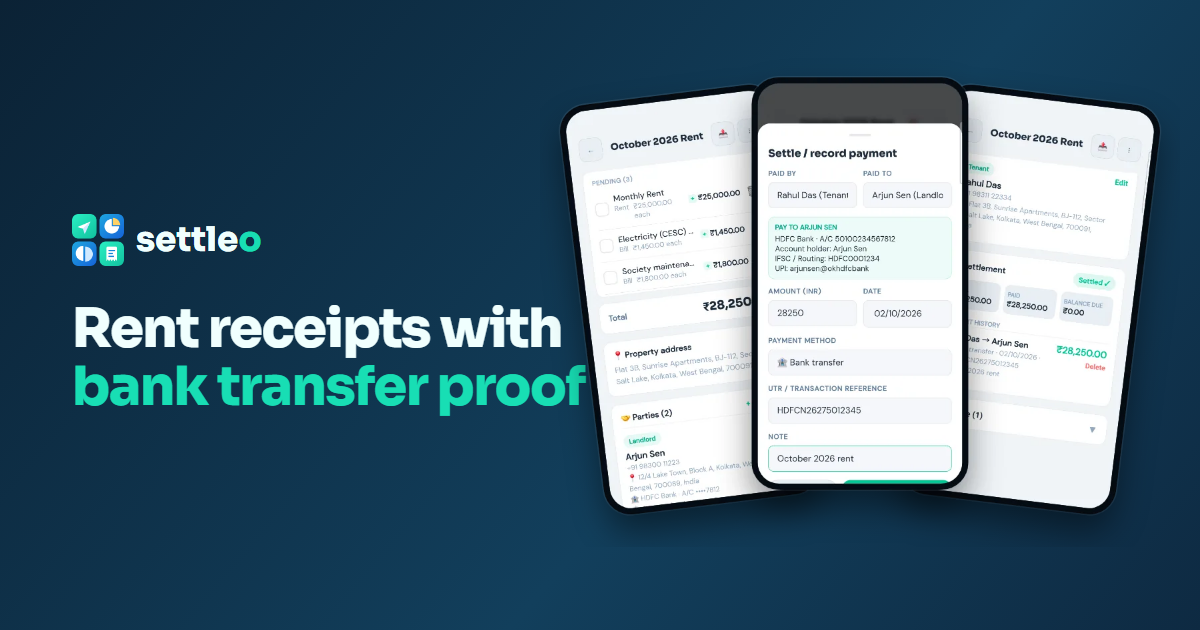
In Settleo, open Slips, tap + and choose House Rent / Deposit. The slip starts with Monthly Rent, Security Deposit and Maintenance lines you can edit. Arjun names it "October 2026 Rent" and fills in ₹25,000 rent, ₹1,800 society maintenance and Rahul's ₹1,450 electricity share: ₹28,250 in total.
2. Add the property address
Every rent slip has a Property address card. Add the flat, street, city and PIN code once, and it appears on the slip and its PDF.
3. Fill in the landlord and tenant
Rent slips come with two parties already set up: Landlord and Tenant. The landlord's name and phone are pre-filled from your profile. For each party you can add an address, a tax ID (PAN, GSTIN or VAT) and payment details. Arjun adds his bank name, account number, IFSC code and UPI ID, so Rahul knows exactly where to pay.
4. Record the bank transfer
Rahul pays from his own bank app as usual. Then, on the slip, he taps Settle / record payment. Settleo fills in the balance due, shows Arjun's bank details, and asks for the method (bank transfer), the date and the UTR / transaction reference. Settleo doesn't move money itself; it keeps the record of the payment you made.
5. Settled, with a PDF receipt
The slip now shows Settled ✓ with the payment history: who paid, how, when and the UTR. A partial payment shows Partially paid with the balance left. Tap export to download a clean PDF with the items, both parties, the landlord's bank details and the payment record.
Why this beats screenshots
- One record per month. Every month's slip sits in one list, so finding last March is easy.
- Proof both sides agree on. The UTR on the slip matches the bank statement.
- Fewer reminders. The tenant always sees the amount due and where to pay.
- Deposits and one-off bills can go on the same slip or their own.
Tips for landlords and tenants
- Make one slip per month and title it with the month, so receipts sort cleanly.
- Keep utility shares as separate line items, so disputes are about one line, not the whole rent.
- Share the slip with the other party so you both see the same status.
- For tax claims, check the current rules with a tax professional; a receipt is evidence, not tax advice.
Try it with your next rent payment
Settleo is free to start on Android and the web, with the same account on both.